Crown 11 / Help & Account Information
Crown 11 Help Centre
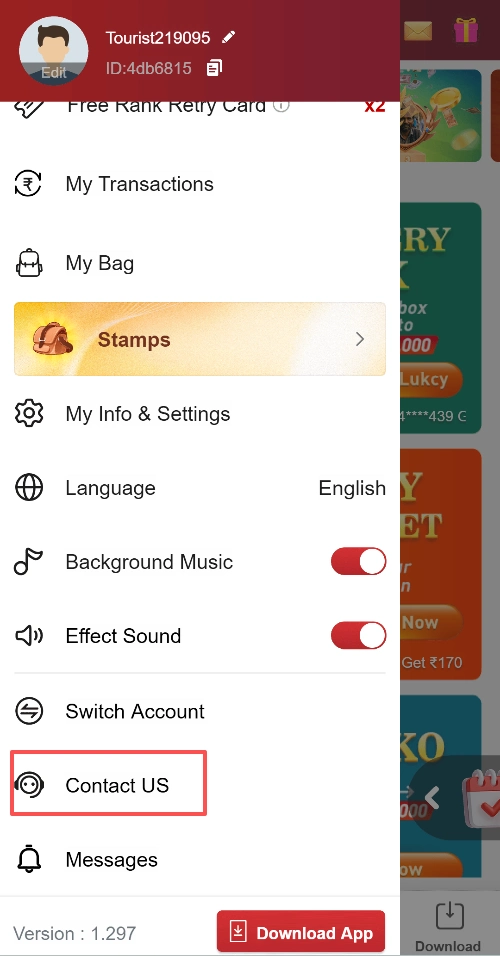
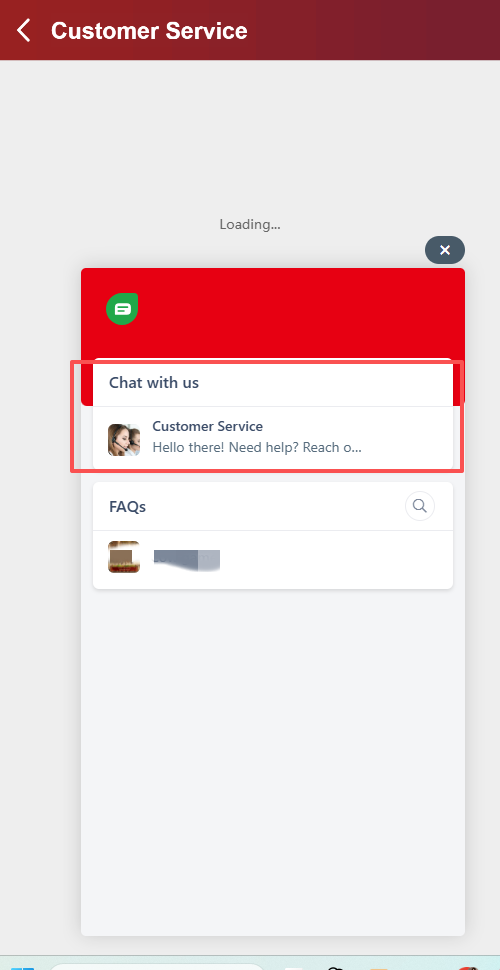
To contact customer service, open My Account → Contact US → Chat with us → Customer Service. Below you can find the illustrated route, account troubleshooting guidance, and the records to prepare for a transaction enquiry.
This page provides guidance only. It does not accept account changes, transaction requests, or private support documents.
Customer Service / In-Service Chat
How to Contact Crown 11 Support
Use the customer-service entry inside the account menu. Follow the route shown in the supplied interface screenshots:
- Open My Account, the account menu.
- Select Contact US.
- After selecting Contact US, locate Chat with us.
- Then select Customer Service and describe your issue.
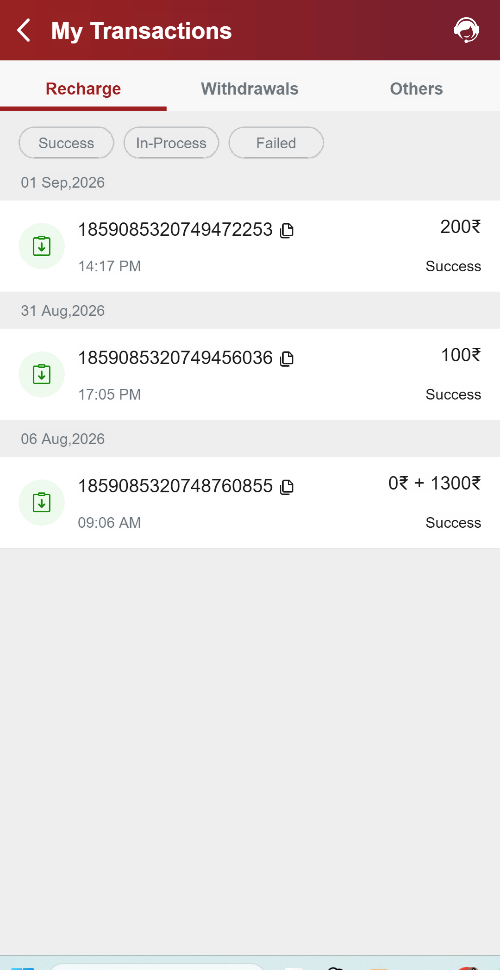
For a transaction enquiry, have the relevant date, amount, transaction reference, and a redacted screenshot ready. Do not share your password or verification code. This route is based on the account interface supplied for this guide; labels may change after an update.
01 / Account Questions
Troubleshoot Without Sharing Your Credentials
Login or Page-Loading Problems
Note the error message and when it appeared. Check your connection and whether the problem affects the browser, the application, or both. Avoid repeatedly submitting credentials if the service reports an account lock.
If a password-reset feature is available, use the one provided by the service you normally access. This guide has not verified its exact menu name or steps.
Unexpected Account Activity
If you notice an unfamiliar session or transaction, preserve the relevant record. If the service provides password changes or session controls, use those controls through your normal access route and raise the issue with its verified support channel.
Do not provide passwords, one-time codes, or remote access to anyone claiming these are necessary to investigate an account issue.
02 / Records & Enquiries
Prepare a Clear Record of the Issue
Reward or Balance Differences
Compare the reward description, activity reference, and credited balance type. An item, token, promotional credit, and cash balance can have different conditions. Record exactly what was shown and what you expected under the applicable rule.
A cropped screenshot can help explain a discrepancy, but it should not expose unrelated transactions or private account details.
A Delayed or Disputed Transaction
Check the displayed transaction status and any stated processing conditions. Preserve the request or payment reference, date, amount, and relevant receipt. A missing update is not proof that a second payment is required; seek clarification through a verified channel.
This page does not promise a processing time or a particular dispute outcome.
Information to Include in an Enquiry
- A short description of the issue and the date it occurred.
- The relevant transaction or activity reference, if available.
- The amount, displayed status, and applicable balance type.
- The device and browser or application version, if relevant.
- A redacted screenshot or receipt that shows the discrepancy.
Do not post account-specific evidence in public comments. Keep passwords, verification codes, full payment credentials, and unrelated identity documents out of an enquiry.
03 / Practical Questions
Questions About Getting Help
Can I submit my account details on this page?
No account-enquiry form is provided here. Do not leave private records in public website comments. Use the service’s verified support channel for account-specific matters.
What if the chat panel does not load?
If the chat does not load, check your connection and reopen Contact US once. Record the error message, approximate time, and device or browser used. Keep a redacted screenshot. No alternative email, phone number, or response time has been verified for this guide. Keeping a record does not create a support ticket or submit an enquiry.
How do I get help if I cannot access my account?
The confirmed customer-service route starts inside My Account. If you cannot sign in, this guide cannot provide a verified alternative contact route. Check whether a recovery option appears on your usual login screen. Do not share verification codes or pay anyone who contacts you claiming they can restore access.
What should I do if I do not have a transaction reference?
Record the date, approximate time, amount, and displayed status. Check the relevant receipt or activity record for a reference. Clearly state in your enquiry which information is unavailable instead of guessing a number.
What should I remove from a screenshot?
Remove passwords, verification codes, full payment credentials, and unrelated personal information. Keep only the fields necessary to explain the issue, and send them through a verified private support channel.
Should I pay someone to unlock a disputed transaction?
Do not send a payment solely because an unsolicited message claims it is needed to resolve an issue. Confirm the request through the service’s verified channel and obtain an explanation of any claimed fee.
Need to Review Another Topic?
Return to the homepage for the available website information, or review the practical questions above.
READY TO OPEN YOUR FREE BOX?
Free opens for every new account
Continue from just ₹10 per box
OPEN A FREE BOX